Missing Click IDs: Why Google Ads Conversions Drop
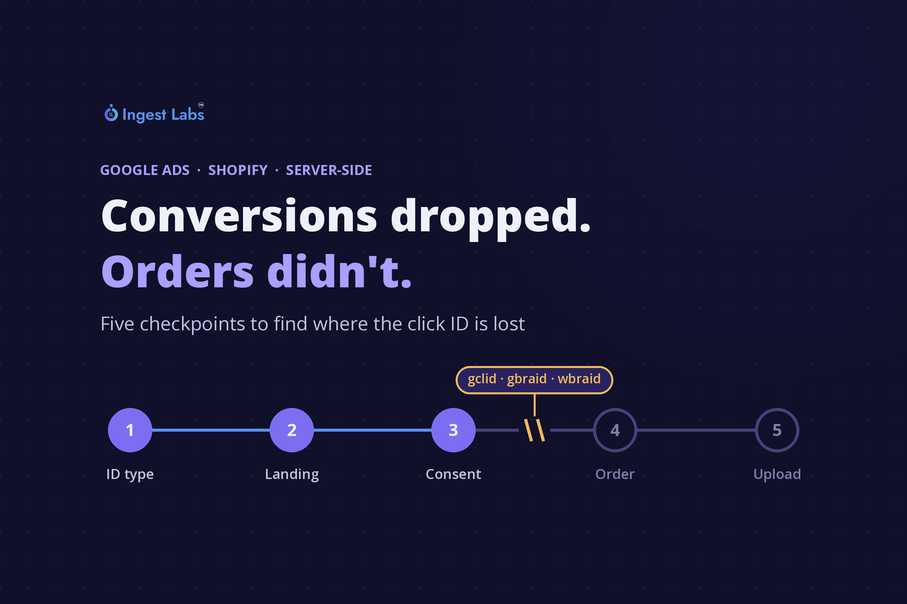
Short answer: When Google Ads conversions fall while clicks, sessions and Shopify orders hold steady, the orders are usually still happening. They are reaching Google without a click ID it can match. Find where the ID is lost by working through five checkpoints in order. First, confirm whether the ID is missing or simply different, because iOS traffic can carry gbraid or wbraid instead of gclid. Second, test whether the ID survives the landing page, since redirects and multi-store routing can drop query strings. Third, check consent, because a denied ad_storage choice stops the ID being written to a first-party cookie. Fourth, confirm the ID travels from the session into the cart and onto the order. Fifth, read offline data diagnostics in Google Ads to separate "never sent" from "sent but unmatched". Then make matching less dependent on the click ID with enhanced conversions, and monitor click-ID fill rate daily.
Why conversions can fall while orders stay flat
Many Shopify brands report purchases to Google Ads through a conversion action whose source is "Import from clicks". Server-side tracking tools send each order to Google with the click identifier captured when the shopper arrived from an ad. Google uses that identifier to tie the purchase back to the click, campaign and keyword.
If the identifier is missing, Google has nothing to match the order against. The sale still happens and still appears in Shopify, but it does not appear as a Google Ads conversion. Bidding then works from a smaller conversion count, which can pull spend away from campaigns that are still selling.
The pattern to look for is specific: clicks, impressions, sessions and Shopify orders are stable, while Google Ads conversions drop and orders with a Google UTM show no click ID. That points to a break in the chain between the ad click and the conversion upload, not to a demand problem.
| What you see | Most likely checkpoint |
|---|---|
| Missing IDs concentrated on iPhone and iPad orders | 1. Different ID type (gbraid or wbraid) |
| Missing IDs on one storefront or country only | 2. Redirect or routing on landing |
| Drop starts on the date a consent banner or CMP setting changed | 3. Consent and storage |
| Click ID present in the browser but absent on the order | 4. Session-to-order handoff |
| Click IDs present on orders, conversions still low | 5. Upload or matching errors |
Checkpoint 1: Is the click ID missing, or is it a different ID?
Google Ads uses three click identifiers. gclid is the standard one. Google's API documentation describes gbraid as the identifier for iOS app conversions and wbraid as the identifier for iOS web conversions. The conversion upload accepts exactly one of the three for each conversion.
A check that only looks for gclid will report iOS orders as "missing" even when a valid identifier was captured. Before anything else:
-
Split the orders with no gclid by device and operating system.
-
Look at the raw landing URLs or stored parameters for those orders and check for gbraid or wbraid.
-
Confirm that your tracking setup stores all three parameters and sends whichever one is present in the upload.
If the gaps are mostly iOS and gbraid or wbraid is present, the fix is in how identifiers are stored and uploaded. Nothing upstream is broken.
Checkpoint 2: Does the click ID survive the landing page?
With auto-tagging on, Google adds the gclid parameter to the URL people click through, so it arrives on the landing page. Anything that rewrites the URL before the page loads can strip it. Common causes:
-
Geo or language redirects that send visitors to a country storefront.
-
Multi-store setups where a global domain forwards to regional domains.
-
Vanity domains, link shorteners and third-party tracking templates.
-
Server or CDN rules that normalise URLs and drop unknown query strings.
How to test it: click a live ad (or open its final URL with a test parameter such as ?gclid=test123), let every redirect resolve, and check the address bar on the page that finally loads. If the parameter is gone, the redirect is the cause. Test each country storefront separately, because routing rules often differ by market. Our guide to Google Ads tracking templates covers template configuration, and the Shopify Markets guide covers how regional storefronts are structured.
Checkpoint 3: Is consent preventing the ID from being stored?
Under Google consent mode, the ad_storage setting controls whether advertising-related storage, such as cookies, can be used. When a visitor denies it, the click ID is not written to a first-party advertising cookie, so it is no longer available on later pages or at checkout unless something else carries it.
Google's URL passthrough option is built for this case. When enabled, it can append ad click parameters such as gclid and wbraid to links that point to the same domain, so click information can carry across pages without cookies. Separately, the ads_data_redaction setting redacts ad click identifiers from Google tag requests when ad_storage is denied. Whether a click ID can then be used in an upload depends on your consent signals and your legal basis in each market.
What to check:
-
The consent acceptance rate before and after the drop, by market. Start with storefronts whose default consent state is denied.
-
Any change to the consent banner, CMP version or default consent state around the date the drop began.
-
Whether URL passthrough and ads_data_redaction are enabled, and whether your server-side setup respects the consent state it receives.
For setup detail, see advanced consent mode for Shopify and consent mode v1 vs v2.
Checkpoint 4: Does the ID reach the order?
Capturing the click ID in the browser is only half the job. It has to travel from the landing session to the order record that your server-side tool uploads. On Shopify, many tracking setups do this by writing the identifier to cart attributes through Shopify's Cart API. Shopify treats cart attributes whose names start with a double underscore (__) as private: they are hidden at checkout but visible on the order details page in the admin, which makes them easy to audit.
The handoff can break without any error message. Check whether any of these changed around the date of the drop:
-
A theme update or new cart drawer that no longer runs the script writing the attribute.
-
Accelerated checkout buttons on product pages, if the script that writes the attribute only runs on the cart page.
-
A move to a headless storefront or a custom checkout domain.
-
An app conflict that overwrites cart attributes.
How to test it: arrive on the site with a test click ID in the URL, place a test order through each checkout path you offer, and confirm the identifier appears on every resulting order.
Checkpoint 5: Was it sent but not matched?
If click IDs are present on orders and conversions are still low, look at what Google received. The offline data diagnostics page in Google Ads summarises the data quality and history of imported conversions and raises alerts for errored events, so you can see whether conversions were rejected rather than never sent.
Errors to look for:
-
The conversion action does not exist in the account receiving the upload, or its source is not "Import from clicks".
-
Conversions older than the conversion window, or conversion times earlier than the click.
Compare the number of uploads Google received for a day with the number of Google-attributed orders in Shopify for the same day. A gap between those two numbers points to delivery. A gap between uploads and reported conversions points to matching.
Make conversion matching less dependent on the click ID
Every click-ID pipeline has gaps: consent choices, browser restrictions and cross-device journeys all remove identifiers. Enhanced conversions add a second route to a match. They send hashed first-party data from the conversion, such as an email address or phone number, which Google uses to match the conversion to signed-in Google accounts that engaged with your ads.
For Shopify purchases, that means sending hashed customer data with each purchase alongside whatever click ID is available, within the limits of the consent each customer has given. It does not replace click-ID hygiene, but it reduces how much a single broken step can cost you.
Monitor two numbers so the next drop takes days to spot, not weeks
Most teams find this problem late because they watch Google Ads conversions on their own. Conversions move for many reasons, so a drop does not stand out until it has run for weeks. Two derived metrics make the break visible quickly:
| Metric | How to calculate it | When to investigate |
|---|---|---|
| Click-ID fill rate | Orders with a gclid, gbraid or wbraid ÷ orders with a Google UTM, per day and per storefront | A sudden step down from its usual level |
| Google Ads to Shopify ratio | Google Ads conversions ÷ Shopify orders attributed to Google, per week and per storefront | A sustained move away from the account's own normal gap |
Each account has its own normal ratio, because the two systems do not count conversions the same way. What matters is a sudden change against that baseline. Alert on both metrics by storefront, since a break in one country is easy to miss in a global total.
Should you switch server-side tracking vendors?
A delivery outage is a fair reason to review a vendor. But if the click ID is being lost before the order is created, through a redirect, a consent setting or a broken cart handoff, any new tool inherits the same loss. Run the five checkpoints first, so you know which problem you are solving.
When you do evaluate a vendor, current or new, ask for:
-
Order-level payload logs showing exactly what was sent to Google for a given order.
-
Alerts when deliveries to a destination fail or fall sharply.
-
Support for gbraid and wbraid as well as gclid.
-
Support for enhanced conversions alongside click-ID uploads.
-
Clear documentation of how consent states change what is stored and sent.
How Ingest Labs approaches this
Ingest IQ is our server-side tagging product, and Ingest ID handles cookieless identity resolution. Before we migrate any brand's tracking, we run the five checkpoints above as an audit. Moving the same break to a new pipeline helps nobody, and the audit tells both sides what the new setup has to fix. If you want a starting point, Site Intelligence gives you a free audit of the tags firing on your site; the sample report shows what it covers.
Frequently asked questions
Why does Google Ads show fewer conversions than Shopify shows orders from Google?
Some gap is normal, because the two systems do not count conversions the same way. A sudden widening of that gap while clicks and orders stay flat usually means orders are reaching Google without a click ID it can match, or are not reaching Google at all.
What is the difference between gclid, gbraid and wbraid?
All three are Google Ads click identifiers. gclid is the standard identifier added to ad landing URLs. Google's API documentation describes gbraid as the identifier for iOS app conversions and wbraid as the identifier for iOS web conversions. Google's conversion upload accepts one of the three for each conversion, so a tracking setup should capture and send whichever is present.
Can Google consent mode cause missing gclid values on orders?
Yes. When a visitor denies ad_storage, the click ID is not stored in a first-party advertising cookie, so it may not be available at checkout. Google's URL passthrough option can append ad click parameters to links on the same domain so the information carries across pages, subject to your consent configuration.
Will switching server-side tracking vendors fix missing click IDs?
Only if the vendor's own delivery was the cause. If click IDs are lost to redirects, consent settings or a broken cart-to-order handoff, a new vendor inherits the same problem. Diagnose where the ID is lost before deciding to migrate.
How do I test whether a redirect is stripping the gclid?
Open an ad's final URL with a test parameter such as ?gclid=test123, let every redirect resolve, and check the address bar on the page that finally loads. If the parameter is missing, a redirect is removing it. Repeat the test for every country storefront.
Do enhanced conversions replace the click ID?
No. Enhanced conversions add hashed first-party data, such as an email address, to a conversion so Google has a second way to match it. They reduce the impact of missing click IDs but work best alongside a clean click-ID pipeline.
Sources
-
Google Ads API, Upload offline conversion sample (checked 2026-10-12): Upload accepts exactly one of gclid, gbraid or wbraid; gbraid for iOS app conversions, wbraid for iOS web conversions
-
Google Ads API, Upload click conversions (checked 2026-10-12): Offline conversion setup stores GCLID, GBRAID or WBRAID; conversion action type for click uploads
-
Google tag platform, Consent mode overview (checked 2026-10-12): ad_storage controls advertising storage such as cookies
-
Google Ads Help, About offline data diagnostics (checked 2026-10-12): Offline data diagnostics shows data quality, history and alerts for errored events
-
Google Ads Help, Fix discrepancies and errors in offline conversion imports (checked 2026-10-12): Common upload errors (conversion action must exist in the receiving account with source "Import from clicks"; conversion older than the conversion window; conversion time before click)
-
Google Ads Help, About enhanced conversions (checked 2026-10-12): Enhanced conversions send hashed first-party data and match to signed-in Google accounts
-
Shopify Ajax Cart API reference (checked 2026-10-12): Cart attributes set through the Cart API; double-underscore attributes are private, hidden at checkout and visible on the order details page
-
Google Ads Help, About auto-tagging (checked 2026-10-12): Auto-tagging adds the gclid parameter to the URL people click through
-
Google tag platform, Set up consent mode on websites (checked 2026-10-12): URL passthrough appends ad click parameters (gclid, wbraid and others) to same-domain links; ads_data_redaction redacts ad click identifiers when ad_storage is denied